Features/Settings · On-Screen Stats
On-Screen Stats
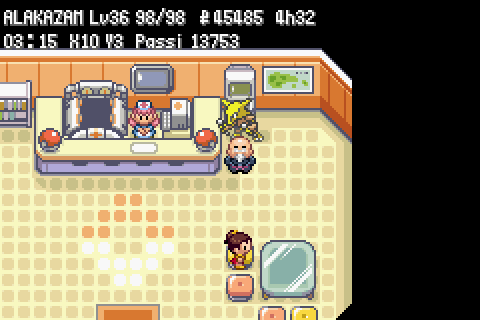
A line across the top of the screen shows your lead Pokémon, money, clock or position.

| Options |
|---|
OffDefault ✅ That item is not shown, as in the original game. |
On That item shows across the top of the screen. |
While you walk freely, a line across the top of the screen shows what you switched on, two items a line, in white letters over the map. There are nine switches, all off by default:
| Switch | Shows |
|---|---|
| Lead Pokémon | your first Pokémon that isn't an Egg: name, level, HP |
| Money & Play Time | the money and the play time as 12h34 |
| Clock | the game's clock, the one Day & Night follows (--:-- if the clock doesn't answer) |
| Position & Steps | X / Y on the map and the steps taken |
| Frontier Streak | inside the Battle Frontier's facilities: the win streak and record of that facility, for the battle mode and level you picked (v82) |
| Repel Steps | how many steps your Repel still works (v82) |
| Pokédex | Pokémon caught and seen (v82) |
| Badges | how many Gym Badges you have (v82) |
| Safari Zone | in the Safari Zone: the balls and steps you have left (v82) |
The line hides during text, menus, cutscenes, the map name sign and in the Battle Pyramid, Battle Pike and Trainer Hill, and comes back at once.
Items that mean nothing right now (no Repel, not in the Frontier) draw nothing. Since v82 the items fill the two lines by their real width, so more of them fit; when too many are on, the last ones are left out.
History
- v80: Lead Pokémon, Money & Play Time, Clock and Position & Steps.
- v82: Frontier Streak, Repel Steps, Pokédex, Badges and Safari Zone were added.
- v83: moved to Settings → On-Screen Stats.
Gallery