Battle Info
Shows stat ups and downs next to the HP boxes, and a SELECT screen with everything the battle keeps hidden.

| Options |
|---|
OffDefault ✅ The battle looks as in the original game. |
On Stat pills next to the HP boxes, and the info screen on SELECT. |
Stat pills
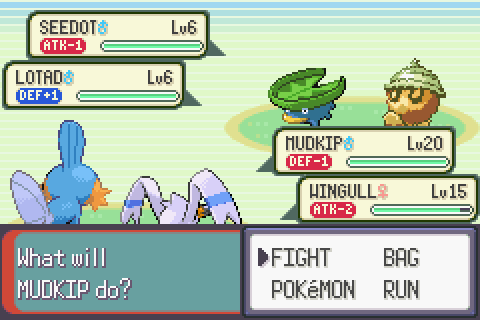
With the switch on, every changed stat of a Pokémon on the field shows as a small pill such as ATK+2: blue for a stat that went up, red for one that went down (ATK, DEF, SPA, SPD, SPE, ACC, EVA).
- Single battle: the foe's pills sit in rows of four under its HP box; yours are in one line on the text box's top edge, so your EXP bar and HP numbers stay visible. The status mark (SLP, PSN, PAR...) stays in the box.
- Double battle: there is no room around the stacked boxes, so the pills show inside the HP box, in the status mark's place. The status and the changed stats take turns, a second and a half each, and a change starts the turns over so you see it at once.
The info screen
In the FIGHT / BAG / POKéMON / RUN menu press SELECT. The screen shows each Pokémon on the field: name, level, status and HP; its seven stat stages (up to +6 in blue, down to -6 in red); and its conditions: confused, in love, trapped, FOCUS ENERGY, SUBSTITUTE, LEECH SEED, cursed, NIGHTMARE, PERISH SONG with its count, TAUNT, ENCORE and DISABLE with the turns left, STOCKPILE, FUTURE SIGHT and WISH, and more.
Below them you see each side's REFLECT, LIGHT SCREEN, SAFEGUARD and MIST with the turns left, SPIKES with their layers, and the weather.
- In a double battle, Left / Right switch between the foes and your side.
- A, B or SELECT take you back to the menu; the battle doesn't go on while you look.
- Not in link battles. A line that doesn't fit ends with "...".
History
- v51: the changes became small pills (they were a line of text under the boxes before).
- v58: in single battles the pills moved out of the status mark's place to sit under the HP boxes (in double battles they still take turns with the status inside the box).
- v72: in a single battle the pills wait while the level-up box with the new stats is on screen.
- v83: moved to Settings → Battle.
Gallery
See also
Move ColorsTurn CounterDouble BattlesPokémon Icons in Battle